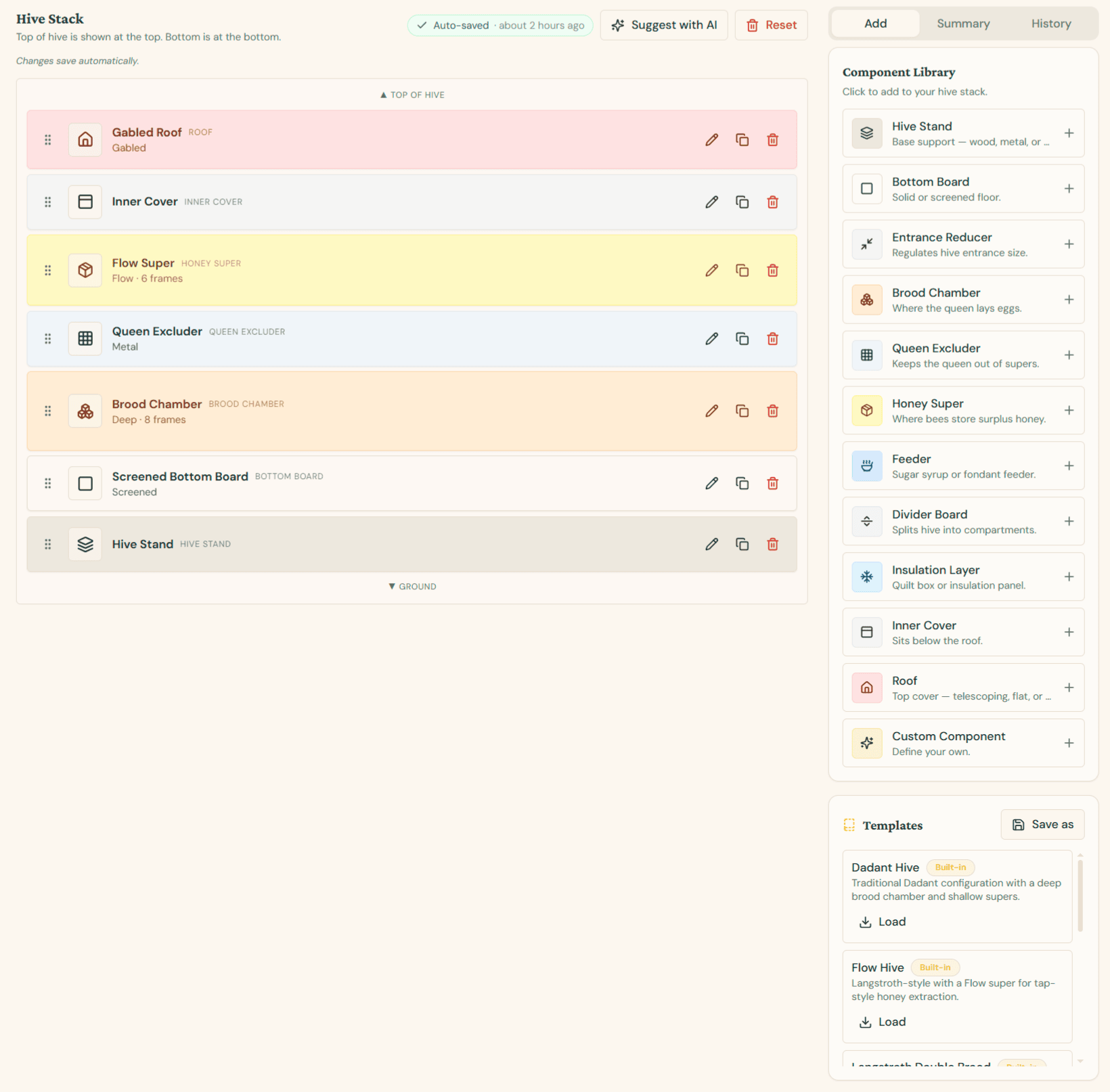
Hive Configurator
The Hive Configurator is a visual builder that lets you design the exact stack of components that make up each hive — from the bottom board all the way up to the roof. Every change is saved automatically, and you can revisit older versions at any time.
Opening the Configurator
- Navigate to Hives from the sidebar
- Open any hive's detail page
- Click the Configurator tab
The hive stack is displayed top-down: the top of the hive is shown at the top of the canvas, and the ground is at the bottom — matching how the hive actually sits in your apiary.
Building Your Stack
Use the Component Library on the right to add parts to your hive. Click any component to drop it into the stack:
| Component | Purpose |
|---|---|
| Hive Stand | Base support — wood, metal, or concrete |
| Bottom Board | Solid or screened floor |
| Entrance Reducer | Regulates hive entrance size |
| Brood Chamber | Where the queen lays eggs |
| Queen Excluder | Keeps the queen out of supers |
| Honey Super | Where bees store surplus honey |
| Feeder | Sugar syrup or fondant feeder |
| Divider Board | Splits hive into compartments |
| Insulation Layer | Quilt box or insulation panel |
| Inner Cover | Sits below the roof |
| Roof | Top cover — telescoping, flat, gabled, or migratory |
| Custom Component | Define your own part for non-standard setups |
Editing Components
Each row in the stack has quick actions:
- Drag handle (left) — Reorder components by dragging up or down
- Edit (pencil) — Open a dialog to set frame count, material, finish, dimensions, and notes
- Duplicate — Create an identical copy directly below
- Delete (trash) — Remove the component from the stack
Components are color-coded by category so you can quickly scan the structure of a hive at a glance.
Suggest with AI
The Suggest with AI button (top of the page) uses ApiaryPilot's AI assistant to recommend a complete hive configuration based on:
- Your hive's location and climate
- The hive type (Langstroth, Warré, Dadant, Flow, etc.)
- Current season and colony strength
- Your existing components and templates
The AI returns a ready-to-use stack — including frame counts, materials, and seasonal recommendations like insulation layers or entrance reducers. You can accept the suggestion as-is, or use it as a starting point and tweak individual components. The AI feature is available on Starter, Team, and Commercial plans.
Templates
The Templates panel on the right gives you pre-built configurations to load instantly:
- Built-in templates — Dadant, Flow Hive, Langstroth Double Brood, and more
- Custom templates — Click Save as to store your current stack as a reusable template for other hives
Loading a template replaces the current stack, so save your work first if needed.
Summary & History
The right-hand tabs give you two extra views:
- Summary — A consolidated overview of all components, frame counts, and materials in the current stack. Useful for ordering parts or generating reports.
- History — A full timeline of every change made to this hive's configuration, with the ability to revert to any previous version.
Auto-save & Reset
Changes save automatically — you'll see an Auto-saved indicator with the time of the last update. If you want to start over, the Reset button clears the stack so you can rebuild from scratch or load a template.
Tip: Configure your hives accurately at the start of each season. The configuration feeds into inspection forms, harvest estimates, and AI recommendations across the rest of ApiaryPilot.