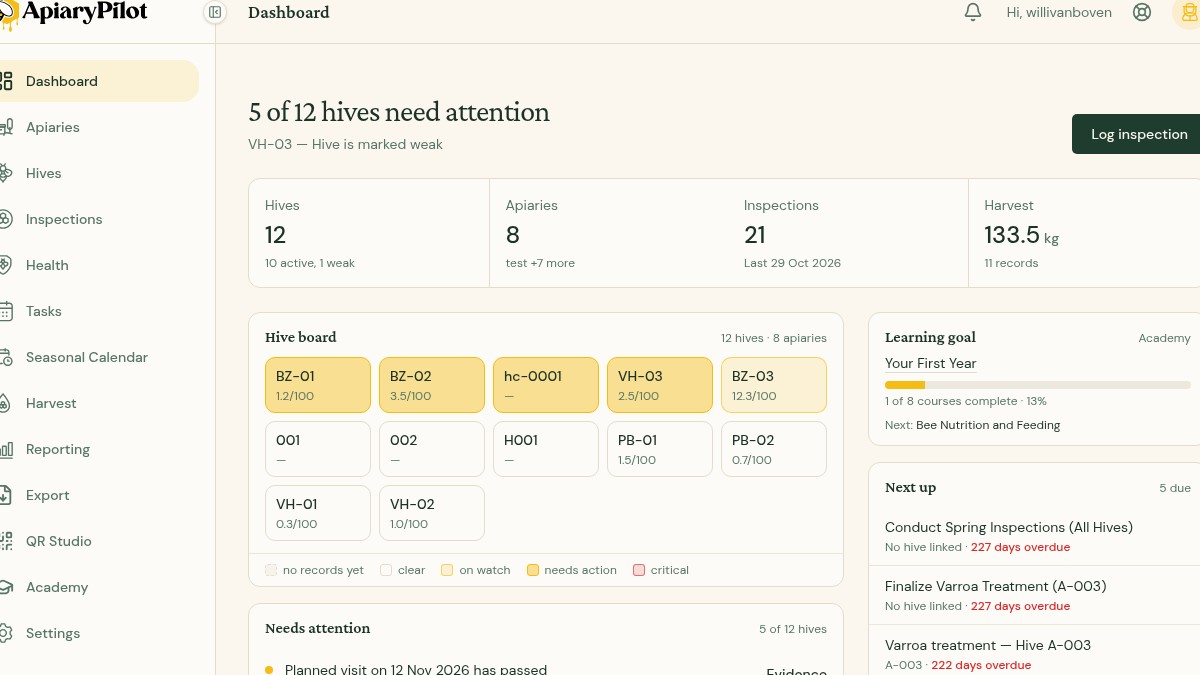
Understanding Hive Risk Status
ApiaryPilot uses the latest records for each hive to answer Which hives need me today? The same risk rules feed the Dashboard hive board, hive pages, Health page, finding lesson cards and AI advisor answers.
The five states
| Status | What it means |
|---|---|
| Clear | Current records do not trigger a rule. This is not a guarantee that the colony is healthy. |
| Watch | Something deserves monitoring or a planned follow-up. |
| Action | A finding needs active management, such as a mite count above your threshold. |
| Critical | The strongest warning level, for example a colony marked weak or dead. |
| Unknown | There is not enough current information to assess the hive. No records is not the same as all clear. |
A dead colony is reported as dead; the advisor does not turn that into treatment advice.
Check the evidence
Open a hive or use Evidence beside a Dashboard finding to see the inspection, mite count, treatment or other record behind it. Findings can include high mites, queen not seen, swarm risk, poor brood, low stores, suspected disease, weak or dead colonies, and overdue inspections.
The app uses the newest relevant record. A newer inspection or mite count can therefore change a status without any manual status setting.
What to do next
- Open the finding's suggested Academy lesson for guidance related to that rule.
- Record a fresh inspection when information is missing or out of date.
- Create a follow-up task from the inspection result when action is needed.
- Ask the AI advisor Which hives need attention? for a summary grounded in the same records.
Watch out: ApiaryPilot supports your decisions but does not diagnose disease or replace local veterinary and beekeeping advice. Always inspect the colony and evidence yourself.